Angular Basic Routing
Step 1: Create a new angular project
ng new basic-routing --no-standalone
I used this command with “—no-standalone” flag to generate app.module.ts automatically, making routing easier.
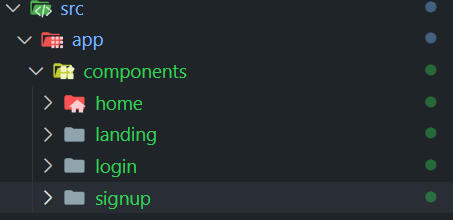
Step 2: Create your components
ng generate component "component name"
or
ng g c "componant name"
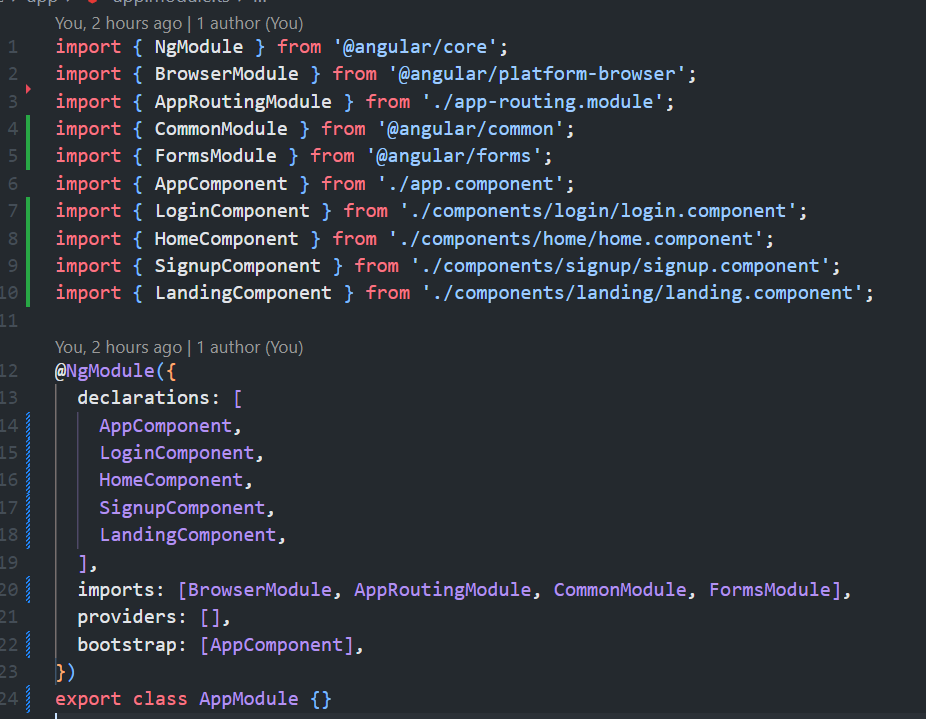
I used this command to generate components, angular will automatically add the components in declarations inside @NgModule.
Step 3: Define your routes
Inside the Routes array, define your paths by making an object with path and component properties.
You can also redirect the user to specific paths when visited a specified path using “redirecTo” property.
app-routing.module.ts
import { NgModule } from '@angular/core';
import { RouterModule, Routes } from '@angular/router';
import { HomeComponent } from './components/home/home.component';
import { LoginComponent } from './components/login/login.component';
import { SignupComponent } from './components/signup/signup.component';
import { LandingComponent } from './components/landing/landing.component';

const routes: Routes = [
  { path: '', redirectTo: '/home', pathMatch: 'full' },
  { path: 'home', component: HomeComponent },
  { path: 'login', component: LoginComponent },
  { path: 'signup', component: SignupComponent },
  { path: 'landing', component: LandingComponent },
];

@NgModule({
  imports: [RouterModule.forRoot(routes)],
  exports: [RouterModule],
})
export class AppRoutingModule {}
Step 4: Link Navigation
You can navigate to different links through the use of anchor element with “routerLink” property
<a [routerLink]="['/signup']">Sign up</a>
Github link: https://github.com/devken4u/AngularBasicRouting